Price (USD)
Close callLinx Gaia
$160
XVape Vista Mini 2
$150
Pricing is very close between both devices.
Vaporizer Comparison
Side-by-side specs, pricing context, and clear decision guidance.
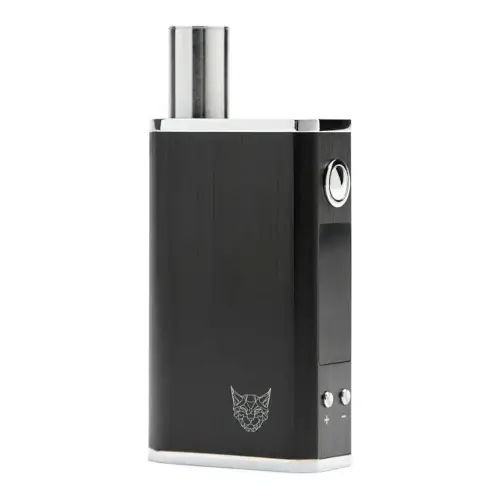
Linx Gaia
Linx Vapor $160
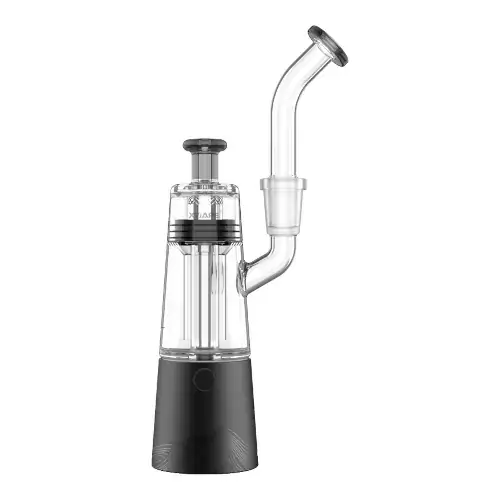
XVape Vista Mini 2
XVape from $99
Linx Gaia and XVape Vista Mini 2 are both portable / electronic vaporizers, but they target different priorities. Their listed prices are close ($160 vs $150). Session style, airflow, and extraction behavior will matter more than raw spec sheet numbers here.
Specs Compared
24
Different Specs
19
Shared Specs
5
Overall Overlap
21%
Shared Traits
A quick snapshot of the specs people usually care about first.
Linx Gaia
$160
XVape Vista Mini 2
$150
Pricing is very close between both devices.
Linx Gaia
146 grams
XVape Vista Mini 2
290 grams
Linx Gaia is the lighter listed unit.
Top specs where these two devices diverge.
Price (USD)
Linx Gaia
$160
XVape Vista Mini 2
$150
Temperature Range
Linx Gaia
93°C - 220°C (200°F-428°F)
XVape Vista Mini 2
280°C - 400°C (536°F - 752°F)
Battery Capacity
Linx Gaia
2200mAh
XVape Vista Mini 2
2000 mAh
Battery Life
Linx Gaia
~2 hours
XVape Vista Mini 2
~30 dabs
Charge Time
Linx Gaia
3 - 4 hours
XVape Vista Mini 2
~3 hours
Dimensions
Linx Gaia
50 x 24 x 80mm
XVape Vista Mini 2
48 x 48 x 145.8mm
Weight
Linx Gaia
146 grams
XVape Vista Mini 2
290 grams
Power Adjustment
Linx Gaia
Digital (precise)
XVape Vista Mini 2
Modular - 4 Stages
Brand
Linx Gaia
Linx Vapor
XVape Vista Mini 2
XVape
Release Date
Linx Gaia
2021
XVape Vista Mini 2
2020
Typical price
$160
No stores listed yet
Lowest price
$99
at Slick Vapes
Prices are read automatically from retailer pages and were last checked Oct 2, 2026; confirm the price at checkout. Some links are affiliate links, which support Thermal Extractions at no extra cost to you.
Direct comparison of every spec from each device profile.
| Specification | Linx Gaia | XVape Vista Mini 2 |
|---|---|---|
| Price (USD) | $160 | $150 |
| Device Type | Portable | Portable |
| Heating Type | Primarily Convection with some Conduction | — |
| Heat Up Time | — | 10 seconds |
| Temperature Range | 93°C - 220°C (200°F-428°F) | 280°C - 400°C (536°F - 752°F) |
| Chamber Capacity | 0.25g | — |
| Battery Type | Internal | — |
| Battery Capacity | 2200mAh | 2000 mAh |
| Battery Life | ~2 hours | ~30 dabs |
| Charging | Micro USB | Micro USB |
| Charge Time | 3 - 4 hours | ~3 hours |
| Dimensions | 50 x 24 x 80mm | 48 x 48 x 145.8mm |
| Weight | 146 grams | 290 grams |
| Power Adjustment | Digital (precise) | Modular - 4 Stages |
| Chamber Material | Quartz | — |
| Concentrate Support | — | Yes |
| Brand | Linx Vapor | XVape |
| Adjustable Airflow | No | No |
| Country of Manufacture | — | China |
| Display Type | OLED | — |
| Manufacturer | — | TopGreen Technology Co |
| Release Date | 2021 | 2020 |
| Session Style | Session | Session |
| Warranty | 1 year | 1 year |
The biggest practical difference is portability: the Linx Gaia is roughly 144g lighter than the XVape Vista Mini 2, which adds up over a day of pocket carry.
Linx Gaia is the lighter unit at 146 grams, around 144g less than the XVape Vista Mini 2 at 290 grams. The lighter device is easier to carry and pocket day-to-day.
Listed prices are close: $160 for the Linx Gaia versus $150 for the XVape Vista Mini 2. Day-to-day price will likely come down to whichever retailer is running a promotion.
Linx Gaia controls heat with digital (precise), while the XVape Vista Mini 2 uses modular - 4 stages. Linx Gaia gives you finer per-degree control.
XVape Vista Mini 2 fully charges in ~3 hours, ahead of 3 - 4 hours on the Linx Gaia.
Linx Gaia's spec sheet lists ~2 hours; the XVape Vista Mini 2 lists ~30 dabs. The two manufacturers measure battery life differently here, so direct comparison isn't straightforward.
Across the 24 specs we line up, they share 5 and differ on 19, an overlap of about 21%. The differences are concentrated in the areas the spec table highlights with a marker.
Jump into the comparison hub to pick any two devices and open a canonical side-by-side page.