Price (USD)
G Pen Roam edgeG Pen Roam
$100
Ruby Wireless
$255
G Pen Roam is typically around $155 lower.
Vaporizer Comparison
Side-by-side specs, pricing context, and clear decision guidance.
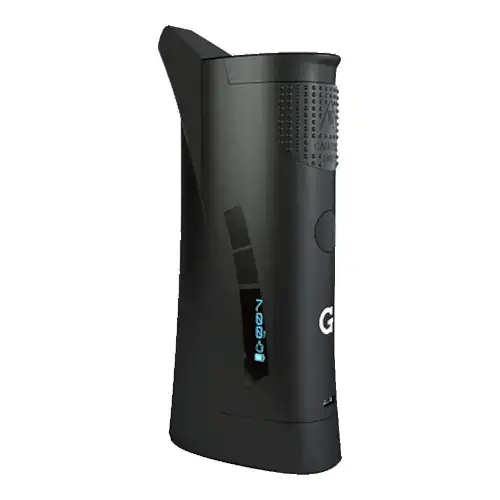
G Pen Roam
Grenco Science from $49.95
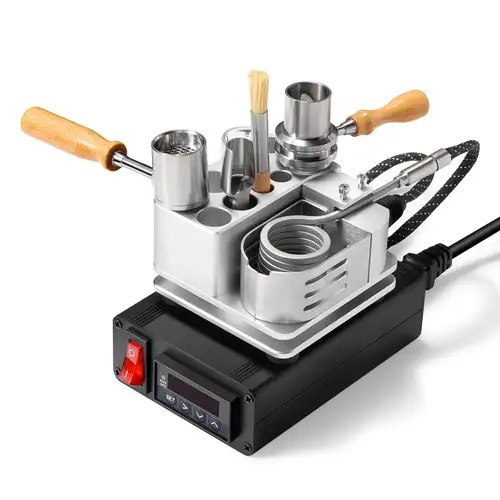
Ruby Wireless
SZ Crossing from $329.99
G Pen Roam and Ruby Wireless are both electronic vaporizers, but they target different priorities. G Pen Roam is usually the lower-cost pick at $100, around $155 below Ruby Wireless. Session style, airflow, and extraction behavior will matter more than raw spec sheet numbers here.
Specs Compared
26
Different Specs
26
Shared Specs
0
Overall Overlap
0%
Shared Traits
A quick snapshot of the specs people usually care about first.
G Pen Roam
$100
Ruby Wireless
$255
G Pen Roam is typically around $155 lower.
G Pen Roam
Conduction
Ruby Wireless
Convection
Heating style differs, which can impact flavor and extraction behavior.
Top specs where these two devices diverge.
Price (USD)
G Pen Roam
$100
Ruby Wireless
$255
Device Type
G Pen Roam
Portable
Ruby Wireless
Desktop
Heating Type
G Pen Roam
Conduction
Ruby Wireless
Convection
Temperature Range
G Pen Roam
204°C - 427°C (400°F - 800°F)
Ruby Wireless
510F - 560F (Suggested)
Battery Type
G Pen Roam
Internal
Ruby Wireless
N/A
Charging
G Pen Roam
Micro-USB
Ruby Wireless
N/A
Power Adjustment
G Pen Roam
Digital Control
Ruby Wireless
Digital (precise)
Chamber Material
G Pen Roam
Quartz
Ruby Wireless
Titanium
Brand
G Pen Roam
Grenco Science
Ruby Wireless
SZ Crossing
Current price
$49.95
at G Pen
Current price
$329.99
at The Stash Shack
Prices are read automatically from retailer pages and were last checked Oct 9, 2026; confirm the price at checkout. Some links are affiliate links, which support Thermal Extractions at no extra cost to you.
Direct comparison of every spec from each device profile.
| Specification | G Pen Roam | Ruby Wireless |
|---|---|---|
| Price (USD) | $100 | $255 |
| Device Type | Portable | Desktop |
| Heating Type | Conduction | Convection |
| Heat Up Time | ~5 seconds | — |
| Temperature Range | 204°C - 427°C (400°F - 800°F) | 510F - 560F (Suggested) |
| Chamber Capacity | — | Not specified |
| Battery Type | Internal | N/A |
| Battery Capacity | 1300mAh | — |
| Battery Life | 15-20 sessions | — |
| Charging | Micro-USB | N/A |
| Charge Time | ~2 hours | — |
| Weight | ~317g | — |
| Power Adjustment | Digital Control | Digital (precise) |
| Chamber Material | Quartz | Titanium |
| Concentrate Support | Yes | — |
| Brand | Grenco Science | SZ Crossing |
| Adjustable Airflow | No | — |
| Ball Type | — | 520 gem-cut rubies |
| Body Material | — | Titanium |
| Coil Size | — | 25mm coaxial |
| Display Type | LED | — |
| Haptic Feedback | Yes | — |
| Joint Size | — | 14.4mm and 18.8mm male |
| Power | — | Classic PID controller with dock |
| Release Date | 2020 | — |
| Warranty | 1 year | — |
The biggest practical difference is price tier: the G Pen Roam sits at $100 while the Ruby Wireless is $255, a gap of about $155 that puts them in different buying brackets.
G Pen Roam is the cheaper option at $100 compared with $255 for the Ruby Wireless, about $155 less. Live retailer pricing can shift, so confirm before buying.
G Pen Roam uses conduction heating, while the Ruby Wireless uses convection. Heating style influences flavor profile, vapor density, and how forgiving the device is to draw technique.
G Pen Roam is the take-anywhere choice. It's a portable, battery-powered unit, while the Ruby Wireless is built for home use, where bigger heaters, AC power, and larger chambers make sense.
Jump into the comparison hub to pick any two devices and open a canonical side-by-side page.