Price (USD)
Sticky Brick Maxx edgePuffco Peak Pro
$450
Sticky Brick Maxx
$190
Sticky Brick Maxx is typically around $260 lower.
Vaporizer Comparison
Side-by-side specs, pricing context, and clear decision guidance.
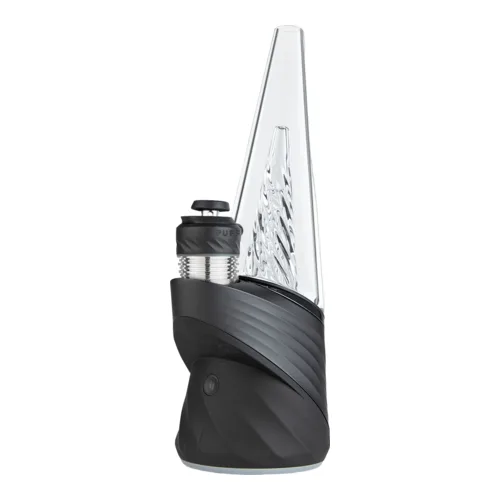
Puffco Peak Pro
Puffco from $420
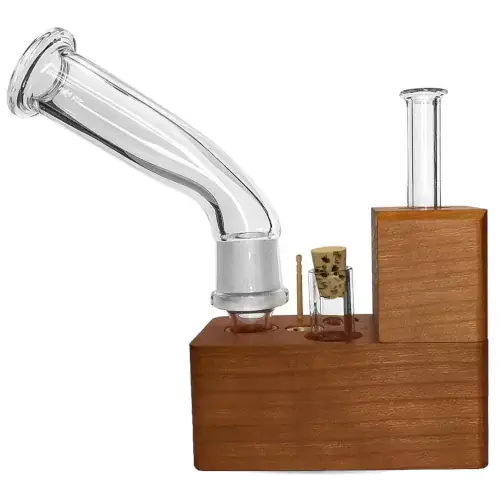
Sticky Brick Maxx
Sticky Brick Labs $190
Puffco Peak Pro and Sticky Brick Maxx are both desktop / premium vaporizers, but they target different priorities. Sticky Brick Maxx is usually the lower-cost pick at $190, around $260 below Puffco Peak Pro. Session style, airflow, and extraction behavior will matter more than raw spec sheet numbers here.
Specs Compared
28
Different Specs
27
Shared Specs
1
Overall Overlap
4%
Shared Traits
A quick snapshot of the specs people usually care about first.
Puffco Peak Pro
$450
Sticky Brick Maxx
$190
Sticky Brick Maxx is typically around $260 lower.
Puffco Peak Pro
Conduction (3DXL Chamber, heated ceramic side walls)
Sticky Brick Maxx
Convection
Heating style differs, which can impact flavor and extraction behavior.
Top specs where these two devices diverge.
Price (USD)
Puffco Peak Pro
$450
Sticky Brick Maxx
$190
Heating Type
Puffco Peak Pro
Conduction (3DXL Chamber, heated ceramic side walls)
Sticky Brick Maxx
Convection
Temperature Range
Puffco Peak Pro
254-302°C (490-575°F) presets, 232-316°C (450-600°F) in the Connect app
Sticky Brick Maxx
N/A
Chamber Capacity
Puffco Peak Pro
3DXL bowl is 23mm deep, 78% more capacity than the standard 3D Chamber
Sticky Brick Maxx
~0.1g - 0.3g
Battery Type
Puffco Peak Pro
Internal, sealed
Sticky Brick Maxx
None
Battery Life
Puffco Peak Pro
~40 dabs per charge
Sticky Brick Maxx
N/A
Charging
Puffco Peak Pro
USB-C and Qi wireless
Sticky Brick Maxx
N/A
Charge Time
Puffco Peak Pro
~2 hours
Sticky Brick Maxx
N/A
Power Adjustment
Puffco Peak Pro
Four presets plus single degree control in the app
Sticky Brick Maxx
Manual
Brand
Puffco Peak Pro
Puffco
Sticky Brick Maxx
Sticky Brick Labs
Lowest price
$420
at The Stash Shack
Typical price
$190
No stores listed yet
No discount code
Prices are read automatically from retailer pages and were last checked Oct 9, 2026; confirm the price at checkout. Some links are affiliate links, which support Thermal Extractions at no extra cost to you.
Direct comparison of every spec from each device profile.
| Specification | Puffco Peak Pro | Sticky Brick Maxx |
|---|---|---|
| Price (USD) | $450 | $190 |
| Device Type | Desktop | Desktop |
| Heating Type | Conduction (3DXL Chamber, heated ceramic side walls) | Convection |
| Heat Up Time | ~20 seconds | — |
| Temperature Range | 254-302°C (490-575°F) presets, 232-316°C (450-600°F) in the Connect app | N/A |
| Chamber Capacity | 3DXL bowl is 23mm deep, 78% more capacity than the standard 3D Chamber | ~0.1g - 0.3g |
| Battery Type | Internal, sealed | None |
| Battery Capacity | — | N/A |
| Battery Life | ~40 dabs per charge | N/A |
| Charging | USB-C and Qi wireless | N/A |
| Charge Time | ~2 hours | N/A |
| Dimensions | 63 x 63 x 155mm base, ~240mm assembled with glass | — |
| Weight | 376 grams (base) | — |
| Power Adjustment | Four presets plus single degree control in the app | Manual |
| Chamber Material | Ceramic | — |
| Concentrate Support | Yes (concentrates only) | — |
| Brand | Puffco | Sticky Brick Labs |
| Adjustable Airflow | XL Joystick Cap steers airflow, no airflow dial | Yes |
| App Control | Yes, Puffco Connect over Bluetooth (up to 25 saved heat profiles) | — |
| Country of Manufacture | China | United States (USA) |
| Display Type | LED ring and under-glass lighting | — |
| Haptic Feedback | Yes | — |
| Heat Cycle Duration | 40 seconds default, up to 2 minutes in the app, Boost adds 15 seconds and about 10°C | — |
| Manufacturer | Puffco | — |
| Release Date | 2020 (current 3DXL kit from 2024) | — |
| Session Style | Session | — |
| Warranty | 2 years on the base, 1 year on the battery, 6 months on the chamber | Lifetime |
| Water Filtration | Yes, Peak Pro Glass 2.0 with five laser cut perc slots | — |
The biggest practical difference is price tier: the Sticky Brick Maxx sits at $190 while the Puffco Peak Pro is $450, a gap of about $260 that puts them in different buying brackets.
Sticky Brick Maxx is the cheaper option at $190 compared with $450 for the Puffco Peak Pro, about $260 less. Live retailer pricing can shift, so confirm before buying.
Puffco Peak Pro uses conduction (3dxl chamber, heated ceramic side walls) heating, while the Sticky Brick Maxx uses convection. Heating style influences flavor profile, vapor density, and how forgiving the device is to draw technique.
Puffco Peak Pro has the larger chamber at 3DXL bowl is 23mm deep, 78% more capacity than the standard 3D Chamber, versus ~0.1g - 0.3g on the Sticky Brick Maxx. A bigger bowl means fewer reloads on long sessions; a smaller one suits microdosing and quicker bowls.
Puffco Peak Pro controls heat with four presets plus single degree control in the app, while the Sticky Brick Maxx uses manual. Puffco Peak Pro gives you finer per-degree control.
Puffco Peak Pro's spec sheet lists ~40 dabs per charge; the Sticky Brick Maxx lists N/A. The two manufacturers measure battery life differently here, so direct comparison isn't straightforward.
Jump into the comparison hub to pick any two devices and open a canonical side-by-side page.