Price (USD)
Close callLinx Gaia
$160
Tempest 2
$179
Pricing is very close between both devices.
Vaporizer Comparison
Side-by-side specs, pricing context, and clear decision guidance.
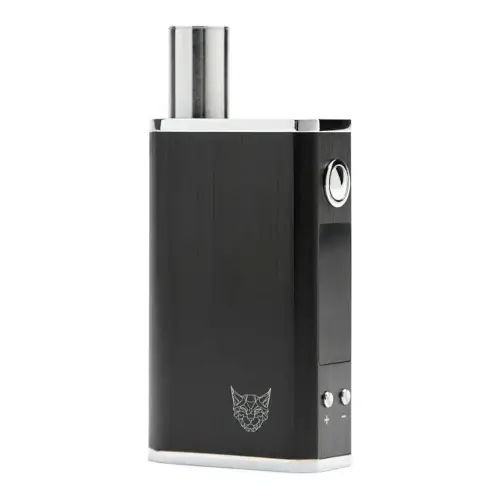
Linx Gaia
Linx Vapor $160
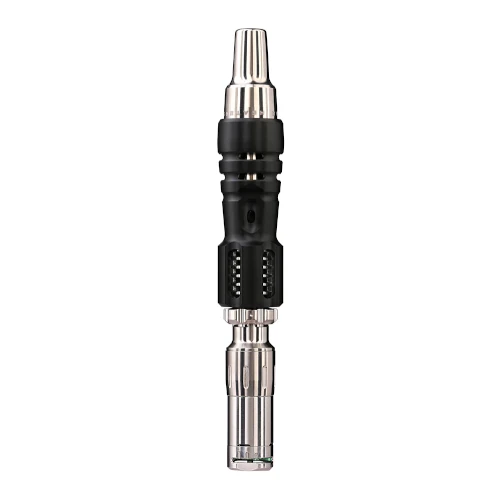
Tempest 2
Mad Heaters $179
Linx Gaia and Tempest 2 are both portable / convection vaporizers, but they target different priorities. Their listed prices are close ($160 vs $179). Session style, airflow, and extraction behavior will matter more than raw spec sheet numbers here.
Specs Compared
23
Different Specs
21
Shared Specs
2
Overall Overlap
9%
Shared Traits
A quick snapshot of the specs people usually care about first.
Linx Gaia
$160
Tempest 2
$179
Pricing is very close between both devices.
Linx Gaia
146 grams
Tempest 2
46g
Tempest 2 is the lighter listed unit.
Linx Gaia
Primarily Convection with some Conduction
Tempest 2
Convection-heavy with thermal ball matrix
Heating style differs, which can impact flavor and extraction behavior.
Top specs where these two devices diverge.
Price (USD)
Linx Gaia
$160
Tempest 2
$179
Heating Type
Linx Gaia
Primarily Convection with some Conduction
Tempest 2
Convection-heavy with thermal ball matrix
Temperature Range
Linx Gaia
93°C - 220°C (200°F-428°F)
Tempest 2
N/A
Chamber Capacity
Linx Gaia
0.25g
Tempest 2
0.1g - 0.2g (adjustable)
Battery Type
Linx Gaia
Internal
Tempest 2
None
Battery Capacity
Linx Gaia
2200mAh
Tempest 2
N/A
Battery Life
Linx Gaia
~2 hours
Tempest 2
N/A
Charging
Linx Gaia
Micro USB
Tempest 2
N/A
Charge Time
Linx Gaia
3 - 4 hours
Tempest 2
N/A
Dimensions
Linx Gaia
50 x 24 x 80mm
Tempest 2
122mm x 18.5mm
Typical price
$160
No stores listed yet
Typical price
$179
Sold by Mad Heaters
Prices are read automatically from retailer pages and were last checked Oct 9, 2026; confirm the price at checkout. Some links are affiliate links, which support Thermal Extractions at no extra cost to you.
Direct comparison of every spec from each device profile.
| Specification | Linx Gaia | Tempest 2 |
|---|---|---|
| Price (USD) | $160 | $179 |
| Device Type | Portable | Portable |
| Heating Type | Primarily Convection with some Conduction | Convection-heavy with thermal ball matrix |
| Heat Up Time | — | ~30-45 seconds with torch |
| Temperature Range | 93°C - 220°C (200°F-428°F) | N/A |
| Chamber Capacity | 0.25g | 0.1g - 0.2g (adjustable) |
| Battery Type | Internal | None |
| Battery Capacity | 2200mAh | N/A |
| Battery Life | ~2 hours | N/A |
| Charging | Micro USB | N/A |
| Charge Time | 3 - 4 hours | N/A |
| Dimensions | 50 x 24 x 80mm | 122mm x 18.5mm |
| Weight | 146 grams | 46g |
| Power Adjustment | Digital (precise) | Visual gauge with click indicators |
| Chamber Material | Quartz | Titanium |
| Brand | Linx Vapor | Mad Heaters |
| Adjustable Airflow | No | Yes |
| Body Material | — | Grade 5 titanium, aluminum heat shield, stainless steel |
| Country of Manufacture | — | Made in China, Assembled in the UK |
| Display Type | OLED | — |
| Release Date | 2021 | — |
| Session Style | Session | — |
| Warranty | 1 year | 1 year |
The biggest practical difference is heating approach: Linx Gaia runs primarily convection with some conduction while Tempest 2 runs convection-heavy with thermal ball matrix. That changes flavor delivery, vapor density, and how the device responds to slow versus fast draws.
Linx Gaia uses primarily convection with some conduction heating, while the Tempest 2 uses convection-heavy with thermal ball matrix. Heating style influences flavor profile, vapor density, and how forgiving the device is to draw technique.
Linx Gaia has the larger chamber at 0.25g, versus 0.1g - 0.2g (adjustable) on the Tempest 2. A bigger bowl means fewer reloads on long sessions; a smaller one suits microdosing and quicker bowls.
Tempest 2 is the lighter unit at 46g, around 100g less than the Linx Gaia at 146 grams. The lighter device is easier to carry and pocket day-to-day.
Listed prices are close: $160 for the Linx Gaia versus $179 for the Tempest 2. Day-to-day price will likely come down to whichever retailer is running a promotion.
Linx Gaia controls heat with digital (precise), while the Tempest 2 uses visual gauge with click indicators. Linx Gaia gives you finer per-degree control.
Linx Gaia's spec sheet lists ~2 hours; the Tempest 2 lists N/A. The two manufacturers measure battery life differently here, so direct comparison isn't straightforward.
Jump into the comparison hub to pick any two devices and open a canonical side-by-side page.