Price (USD)
Close callKandypens Oculus
$100
Verb DHV
$100
Pricing is very close between both devices.
Vaporizer Comparison
Side-by-side specs, pricing context, and clear decision guidance.
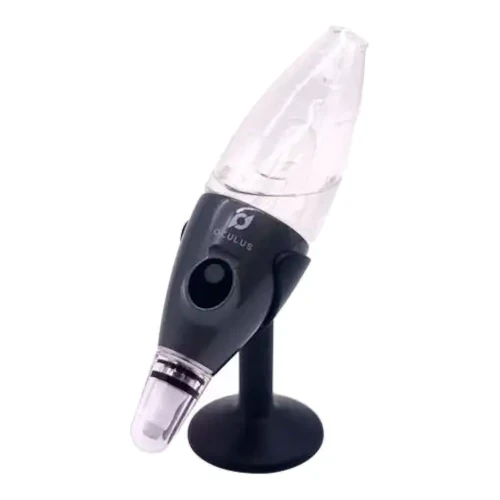
Kandypens Oculus
Kandypens $100
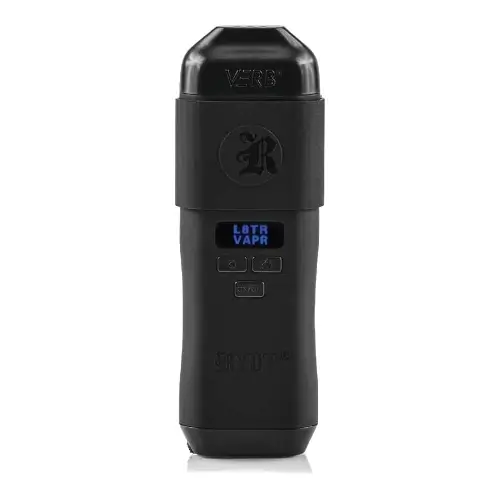
Verb DHV
RYOT from $85
Kandypens Oculus and Verb DHV are both portable / budget vaporizers, but they target different priorities. Their listed prices are close ($100 vs $100). Session style, airflow, and extraction behavior will matter more than raw spec sheet numbers here.
Specs Compared
22
Different Specs
20
Shared Specs
2
Overall Overlap
9%
Shared Traits
A quick snapshot of the specs people usually care about first.
Kandypens Oculus
$100
Verb DHV
$100
Pricing is very close between both devices.
Kandypens Oculus
Conduction
Verb DHV
Convection
Heating style differs, which can impact flavor and extraction behavior.
Top specs where these two devices diverge.
Heating Type
Kandypens Oculus
Conduction
Verb DHV
Convection
Chamber Capacity
Kandypens Oculus
N/A
Verb DHV
~0.2g
Battery Capacity
Kandypens Oculus
500mAh
Verb DHV
1200mAh
Charging
Kandypens Oculus
USB-C
Verb DHV
Micro-USB
Power Adjustment
Kandypens Oculus
3 Preset Voltage Settings
Verb DHV
Digital
Brand
Kandypens Oculus
Kandypens
Verb DHV
RYOT
Warranty
Kandypens Oculus
Lifetime (battery)
Verb DHV
2 years
Typical price
$100
No stores listed yet
No discount code
Lowest price
$85
at RYOT
Prices are read automatically from retailer pages and were last checked Oct 9, 2026; confirm the price at checkout. Some links are affiliate links, which support Thermal Extractions at no extra cost to you.
Direct comparison of every spec from each device profile.
| Specification | Kandypens Oculus | Verb DHV |
|---|---|---|
| Price (USD) | $100 | $100 |
| Device Type | Portable | Portable |
| Heating Type | Conduction | Convection |
| Temperature Range | — | 165°C - 215°C (330°F - 420°F) |
| Chamber Capacity | N/A | ~0.2g |
| Battery Type | Internal | — |
| Battery Capacity | 500mAh | 1200mAh |
| Battery Life | — | Up to 8 Sessions |
| Charging | USB-C | Micro-USB |
| Charge Time | — | ~90 minutes |
| Dimensions | — | 6 x 3.6 x 1.7 inches |
| Power Adjustment | 3 Preset Voltage Settings | Digital |
| Chamber Material | — | Stainless Steel |
| Concentrate Support | Yes | — |
| Brand | Kandypens | RYOT |
| Adjustable Airflow | — | Yes |
| Display Type | — | OLED |
| Release Date | — | 2023 |
| Session Style | — | Session |
| Tip Material | Quartz Mesh | — |
| Warranty | Lifetime (battery) | 2 years |
| Water Filtration | Yes | — |
The biggest practical difference is heating approach: Kandypens Oculus runs conduction while Verb DHV runs convection. That changes flavor delivery, vapor density, and how the device responds to slow versus fast draws.
Kandypens Oculus uses conduction heating, while the Verb DHV uses convection. Heating style influences flavor profile, vapor density, and how forgiving the device is to draw technique.
Listed prices are close: $100 for the Kandypens Oculus versus $100 for the Verb DHV. Day-to-day price will likely come down to whichever retailer is running a promotion.
Kandypens Oculus controls heat with 3 preset voltage settings, while the Verb DHV uses digital. Verb DHV gives you finer per-degree control.
Kandypens Oculus lists a chamber capacity of N/A; the Verb DHV lists ~0.2g.
Verb DHV is the better pick if low-profile use matters. It's tagged as stealth or pocket-friendly in our database, while the Kandypens Oculus is more conspicuous in hand and harder to keep out of sight.
Kandypens Oculus charges over USB-C; the Verb DHV uses a Micro-USB port. USB-C means one fewer cable to keep around if your phone and laptop already use it.
Jump into the comparison hub to pick any two devices and open a canonical side-by-side page.