Price (USD)
Linx Gaia edgeIspire Daab
$250
Linx Gaia
$160
Linx Gaia is typically around $90 lower.
Vaporizer Comparison
Side-by-side specs, pricing context, and clear decision guidance.
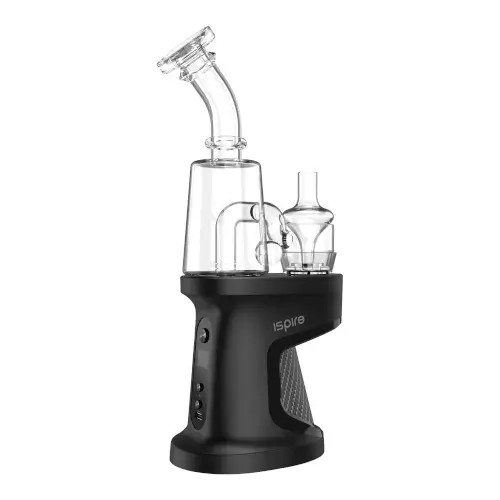
Ispire Daab
Ispire from $249.95
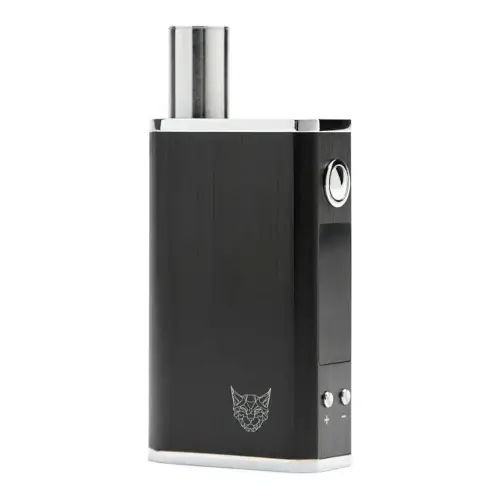
Linx Gaia
Linx Vapor $160
Ispire Daab and Linx Gaia are both portable / electronic vaporizers, but they target different priorities. Linx Gaia is usually the lower-cost pick at $160, around $90 below Ispire Daab. Session style, airflow, and extraction behavior will matter more than raw spec sheet numbers here.
Specs Compared
22
Different Specs
20
Shared Specs
2
Overall Overlap
9%
Shared Traits
A quick snapshot of the specs people usually care about first.
Ispire Daab
$250
Linx Gaia
$160
Linx Gaia is typically around $90 lower.
Ispire Daab
~472g
Linx Gaia
146 grams
Linx Gaia is the lighter listed unit.
Ispire Daab
Induction
Linx Gaia
Primarily Convection with some Conduction
Heating style differs, which can impact flavor and extraction behavior.
Top specs where these two devices diverge.
Price (USD)
Ispire Daab
$250
Linx Gaia
$160
Heating Type
Ispire Daab
Induction
Linx Gaia
Primarily Convection with some Conduction
Temperature Range
Ispire Daab
250°F - 800°F
Linx Gaia
93°C - 220°C (200°F-428°F)
Chamber Capacity
Ispire Daab
0.1g - 0.3g
Linx Gaia
0.25g
Battery Type
Ispire Daab
Removable Dual 18650
Linx Gaia
Internal
Battery Capacity
Ispire Daab
2x 2900mAh
Linx Gaia
2200mAh
Battery Life
Ispire Daab
~60 minutes
Linx Gaia
~2 hours
Charging
Ispire Daab
USB-C
Linx Gaia
Micro USB
Charge Time
Ispire Daab
2-2.5 hours
Linx Gaia
3 - 4 hours
Dimensions
Ispire Daab
248x89x57mm
Linx Gaia
50 x 24 x 80mm
Current price
$249.95
at Grasscity
Typical price
$160
No stores listed yet
No discount code
Prices are read automatically from retailer pages and were last checked Oct 2, 2026; confirm the price at checkout. Some links are affiliate links, which support Thermal Extractions at no extra cost to you.
Direct comparison of every spec from each device profile.
| Specification | Ispire Daab | Linx Gaia |
|---|---|---|
| Price (USD) | $250 | $160 |
| Device Type | Portable | Portable |
| Heating Type | Induction | Primarily Convection with some Conduction |
| Temperature Range | 250°F - 800°F | 93°C - 220°C (200°F-428°F) |
| Chamber Capacity | 0.1g - 0.3g | 0.25g |
| Battery Type | Removable Dual 18650 | Internal |
| Battery Capacity | 2x 2900mAh | 2200mAh |
| Battery Life | ~60 minutes | ~2 hours |
| Charging | USB-C | Micro USB |
| Charge Time | 2-2.5 hours | 3 - 4 hours |
| Dimensions | 248x89x57mm | 50 x 24 x 80mm |
| Weight | ~472g | 146 grams |
| Power Adjustment | Digital | Digital (precise) |
| Chamber Material | Borosilicate Glass | Quartz |
| Concentrate Support | Yes | — |
| Brand | Ispire | Linx Vapor |
| Adjustable Airflow | Yes | No |
| Country of Manufacture | China | — |
| Display Type | — | OLED |
| Release Date | 2022 | 2021 |
| Session Style | — | Session |
| Warranty | 1 year | 1 year |
The biggest practical difference is heating approach: Ispire Daab runs induction while Linx Gaia runs primarily convection with some conduction. That changes flavor delivery, vapor density, and how the device responds to slow versus fast draws.
Linx Gaia is the cheaper option at $160 compared with $250 for the Ispire Daab, about $90 less. Live retailer pricing can shift, so confirm before buying.
Ispire Daab uses induction heating, while the Linx Gaia uses primarily convection with some conduction. Heating style influences flavor profile, vapor density, and how forgiving the device is to draw technique.
Linx Gaia has the larger chamber at 0.25g, versus 0.1g - 0.3g on the Ispire Daab. A bigger bowl means fewer reloads on long sessions; a smaller one suits microdosing and quicker bowls.
Linx Gaia is the lighter unit at 146 grams, around 326g less than the Ispire Daab at ~472g. The lighter device is easier to carry and pocket day-to-day.
Linx Gaia is rated for ~2 hours, ahead of ~60 minutes on the Ispire Daab. Real-world battery life depends on how high you set the temperature and how long sessions run.
Ispire Daab uses removable dual 18650, so you can carry spares for back-to-back days. The Linx Gaia has a built-in battery you can't swap on the go.
Jump into the comparison hub to pick any two devices and open a canonical side-by-side page.