Price (USD)
Close callArizer V Tower
$88
G Pen Roam
$100
Pricing is very close between both devices.
Vaporizer Comparison
Side-by-side specs, pricing context, and clear decision guidance.
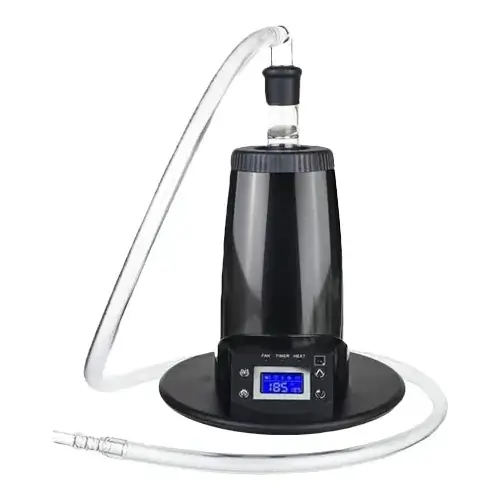
Arizer V Tower
Arizer from $112.49
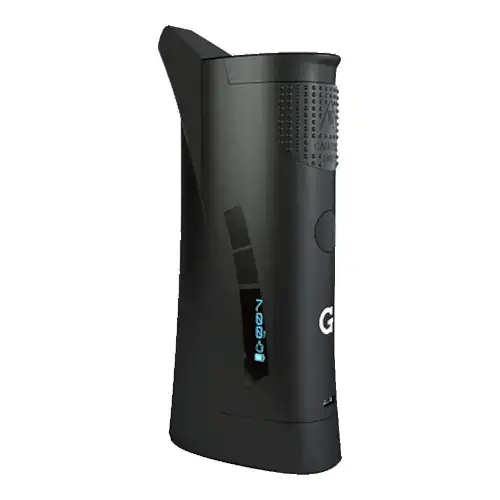
G Pen Roam
Grenco Science from $49.95
Arizer V Tower and G Pen Roam are both electronic vaporizers, but they target different priorities. Their listed prices are close ($88 vs $100). G Pen Roam has the quicker listed heat-up profile, which can matter for shorter sessions.
Specs Compared
23
Different Specs
23
Shared Specs
0
Overall Overlap
0%
Shared Traits
A quick snapshot of the specs people usually care about first.
Arizer V Tower
$88
G Pen Roam
$100
Pricing is very close between both devices.
Arizer V Tower
1-2 minutes
G Pen Roam
~5 seconds
G Pen Roam has the quicker listed heat-up profile.
Arizer V Tower
428g
G Pen Roam
~317g
G Pen Roam is the lighter listed unit.
Arizer V Tower
Convection
G Pen Roam
Conduction
Heating style differs, which can impact flavor and extraction behavior.
Top specs where these two devices diverge.
Price (USD)
Arizer V Tower
$88
G Pen Roam
$100
Device Type
Arizer V Tower
Desktop
G Pen Roam
Portable
Heating Type
Arizer V Tower
Convection
G Pen Roam
Conduction
Heat Up Time
Arizer V Tower
1-2 minutes
G Pen Roam
~5 seconds
Temperature Range
Arizer V Tower
50°C-260°C
G Pen Roam
204°C - 427°C (400°F - 800°F)
Battery Type
Arizer V Tower
N/A
G Pen Roam
Internal
Charging
Arizer V Tower
N/A
G Pen Roam
Micro-USB
Weight
Arizer V Tower
428g
G Pen Roam
~317g
Power Adjustment
Arizer V Tower
Digital
G Pen Roam
Digital Control
Chamber Material
Arizer V Tower
Glass
G Pen Roam
Quartz
Lowest price
$112.49
at The Stash Shack
Current price
$49.95
at G Pen
Prices are read automatically from retailer pages and were last checked Oct 9, 2026; confirm the price at checkout. Some links are affiliate links, which support Thermal Extractions at no extra cost to you.
Direct comparison of every spec from each device profile.
| Specification | Arizer V Tower | G Pen Roam |
|---|---|---|
| Price (USD) | $88 | $100 |
| Device Type | Desktop | Portable |
| Heating Type | Convection | Conduction |
| Heat Up Time | 1-2 minutes | ~5 seconds |
| Temperature Range | 50°C-260°C | 204°C - 427°C (400°F - 800°F) |
| Chamber Capacity | ~0.7g | — |
| Battery Type | N/A | Internal |
| Battery Capacity | — | 1300mAh |
| Battery Life | — | 15-20 sessions |
| Charging | N/A | Micro-USB |
| Charge Time | — | ~2 hours |
| Dimensions | 165x165x170mm | — |
| Weight | 428g | ~317g |
| Power Adjustment | Digital | Digital Control |
| Chamber Material | Glass | Quartz |
| Concentrate Support | — | Yes |
| Brand | Arizer | Grenco Science |
| Adjustable Airflow | — | No |
| Country of Manufacture | China | — |
| Display Type | — | LED |
| Haptic Feedback | — | Yes |
| Release Date | 2010 | 2020 |
| Warranty | 3 years | 1 year |
The biggest practical difference is form factor: these aren't the same kind of device. Arizer V Tower is a desktop, G Pen Roam is a portable. Pick based on whether you want something portable or something stationary.
G Pen Roam reaches session-ready temperature in ~5 seconds, while the Arizer V Tower takes 1-2 minutes. That's roughly 85 seconds quicker on the G Pen Roam, which is useful if you want shorter, on-demand sessions.
Arizer V Tower uses convection heating, while the G Pen Roam uses conduction. Heating style influences flavor profile, vapor density, and how forgiving the device is to draw technique.
G Pen Roam is the lighter unit at ~317g, around 111g less than the Arizer V Tower at 428g. The lighter device is easier to carry and pocket day-to-day.
G Pen Roam is the take-anywhere choice. It's a portable, battery-powered unit, while the Arizer V Tower is built for home use, where bigger heaters, AC power, and larger chambers make sense.
Listed prices are close: $88 for the Arizer V Tower versus $100 for the G Pen Roam. Day-to-day price will likely come down to whichever retailer is running a promotion.
Jump into the comparison hub to pick any two devices and open a canonical side-by-side page.