Price (USD)
Arizer Extreme Q edgeArizer Extreme Q
$160
Sticky Brick Maxx
$190
Arizer Extreme Q is typically around $30 lower.
Vaporizer Comparison
Side-by-side specs, pricing context, and clear decision guidance.
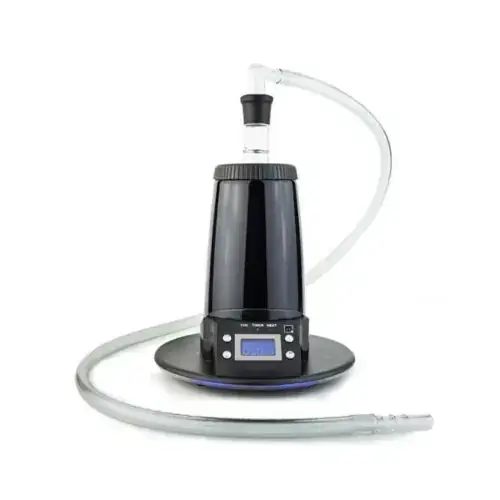
Arizer Extreme Q
Arizer from $199.99
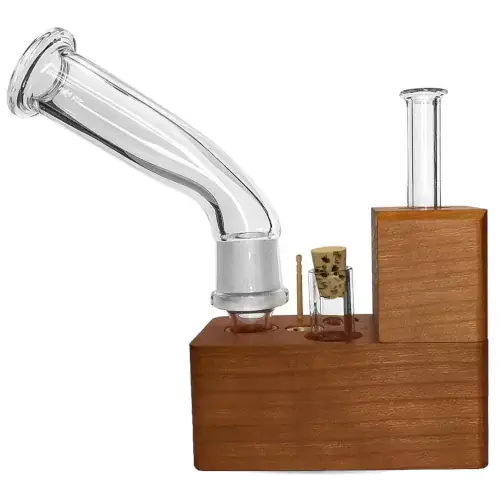
Sticky Brick Maxx
Sticky Brick Labs $190
Arizer Extreme Q and Sticky Brick Maxx are both desktop / convection vaporizers, but they target different priorities. Arizer Extreme Q is usually the lower-cost pick at $160, around $30 below Sticky Brick Maxx. Session style, airflow, and extraction behavior will matter more than raw spec sheet numbers here.
Specs Compared
22
Different Specs
18
Shared Specs
4
Overall Overlap
18%
Shared Traits
A quick snapshot of the specs people usually care about first.
Arizer Extreme Q
$160
Sticky Brick Maxx
$190
Arizer Extreme Q is typically around $30 lower.
Arizer Extreme Q
Convection
Sticky Brick Maxx
Convection
Both devices use a similar heating approach.
Top specs where these two devices diverge.
Price (USD)
Arizer Extreme Q
$160
Sticky Brick Maxx
$190
Temperature Range
Arizer Extreme Q
50°C-260°C
Sticky Brick Maxx
N/A
Chamber Capacity
Arizer Extreme Q
~0.7g
Sticky Brick Maxx
~0.1g - 0.3g
Battery Type
Arizer Extreme Q
N/A
Sticky Brick Maxx
None
Power Adjustment
Arizer Extreme Q
Digital Control
Sticky Brick Maxx
Manual
Brand
Arizer Extreme Q
Arizer
Sticky Brick Maxx
Sticky Brick Labs
Country of Manufacture
Arizer Extreme Q
China
Sticky Brick Maxx
United States (USA)
Warranty
Arizer Extreme Q
3 years
Sticky Brick Maxx
Lifetime
Current price
$199.99
at Slick Vapes
Typical price
$190
No stores listed yet
Prices are read automatically from retailer pages and were last checked Oct 9, 2026; confirm the price at checkout. Some links are affiliate links, which support Thermal Extractions at no extra cost to you.
Direct comparison of every spec from each device profile.
| Specification | Arizer Extreme Q | Sticky Brick Maxx |
|---|---|---|
| Price (USD) | $160 | $190 |
| Device Type | Desktop | Desktop |
| Heating Type | Convection | Convection |
| Heat Up Time | ~100 seconds | — |
| Temperature Range | 50°C-260°C | N/A |
| Chamber Capacity | ~0.7g | ~0.1g - 0.3g |
| Battery Type | N/A | None |
| Battery Capacity | — | N/A |
| Battery Life | — | N/A |
| Charging | N/A | N/A |
| Charge Time | — | N/A |
| Dimensions | 165x165x170mm | — |
| Weight | 442g | — |
| Power Adjustment | Digital Control | Manual |
| Chamber Material | Glass | — |
| Brand | Arizer | Sticky Brick Labs |
| Adjustable Airflow | Yes | Yes |
| Country of Manufacture | China | United States (USA) |
| Heating Element | Ceramic | — |
| Release Date | 2010 | — |
| Remote Control | Yes | — |
| Warranty | 3 years | Lifetime |
There's no single headline gap. The differences are spread across 18 smaller spec rows rather than concentrated in one place. The spec table below marks each row that differs.
Arizer Extreme Q is the cheaper option at $160 compared with $190 for the Sticky Brick Maxx, about $30 less. Live retailer pricing can shift, so confirm before buying.
Arizer Extreme Q has the larger chamber at ~0.7g, versus ~0.1g - 0.3g on the Sticky Brick Maxx. A bigger bowl means fewer reloads on long sessions; a smaller one suits microdosing and quicker bowls.
Arizer Extreme Q controls heat with digital control, while the Sticky Brick Maxx uses manual. Arizer Extreme Q gives you finer per-degree control.
Across the 22 specs we line up, they share 4 and differ on 18, an overlap of about 18%. The differences are concentrated in the areas the spec table highlights with a marker.
Jump into the comparison hub to pick any two devices and open a canonical side-by-side page.